Integrate PLM with SAP, the GDSN and retailer platforms
An approved recipe does not stop at the product record. The same data has to travel on: to the ERP, to your retailers’ platforms, to the GDSN network, to your website. In many companies that journey is still made by hand — one export per destination, one file touched up before every send. That is where data goes missing, and where product records get rejected.
The hidden cost is not the export, it is keeping it alive
Every destination has its own requirements: a file format, a set of units, a list of mandatory fields, its own way of naming an allergen. None of that is hard in itself. What costs is keeping the whole set working, year after year.
- A retailer adds a field, and the export that feeds it has to be reworked.
- A regulation changes a mandatory statement, and it must be echoed everywhere.
- The person who wrote the macro moves on, and nobody dares touch it again.
The real warning sign lies elsewhere. Ask your team this: “was the record for item 10428 sent to that retailer, and on what date?” If answering means opening a mailbox and hunting for a file, the export is not the problem. The problem is that no system keeps track of what was actually sent.
A standard connector rather than a bespoke development
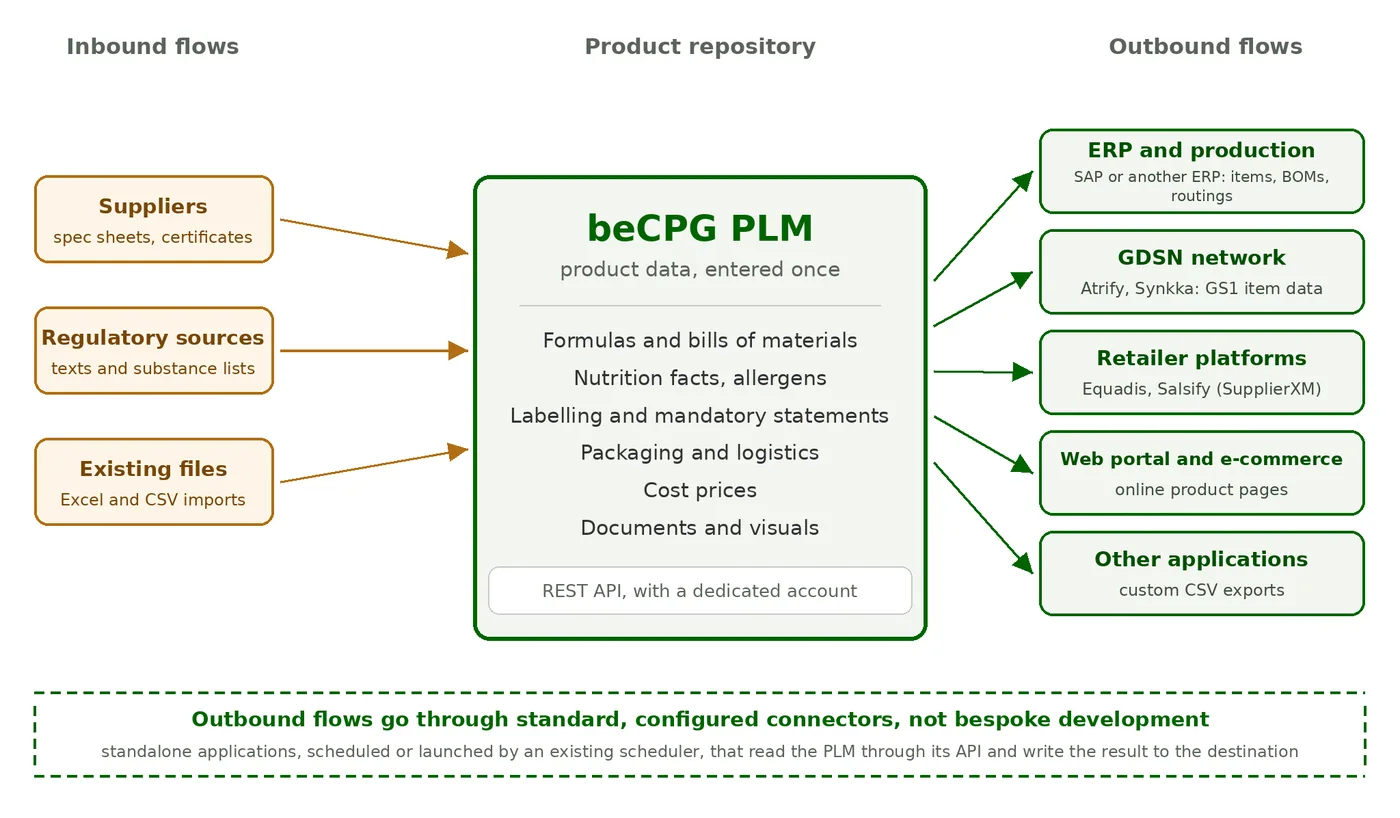
That is the principle behind beCPG: the PLM holds the product data, and standard connectors carry it wherever it has to go. They already exist for the destinations the industry uses most.
- GS1 / GDSN — builds the product record as a Catalogue Item Notification and delivers it to Atrify or Synkka.
- Equadis and Salsify (SupplierXM) — publishes to the platforms used by retailers and e-commerce.
- SAP — items, bills of materials and production routings, as OData for S/4HANA or as IDoc for older integrations.
- CSV — the general-purpose one: other ERPs, MES, web portals, in-house applications, anything that reads a structured file.
Inbound flows take other routes, such as the supplier portal or Excel and CSV imports, and beCPG’s own analysis cubes read the repository directly: those are not connectors.
The important point fits in one sentence: these connectors are standalone applications. They are not installed inside the PLM — they query it through its REST API with a dedicated account. When this article was first written, in 2013, we described these exchanges as a data bus you had to put in place. The need has not changed; what has changed is that there is no bus left to build to publish your product records. And if your information system already has a service bus or an integration platform, the connectors fit into it: they drop files or run from the existing scheduler.
What gets configured, and what never gets coded
Putting a connector to work means answering four questions: which products, read how, turned into what, dropped where.
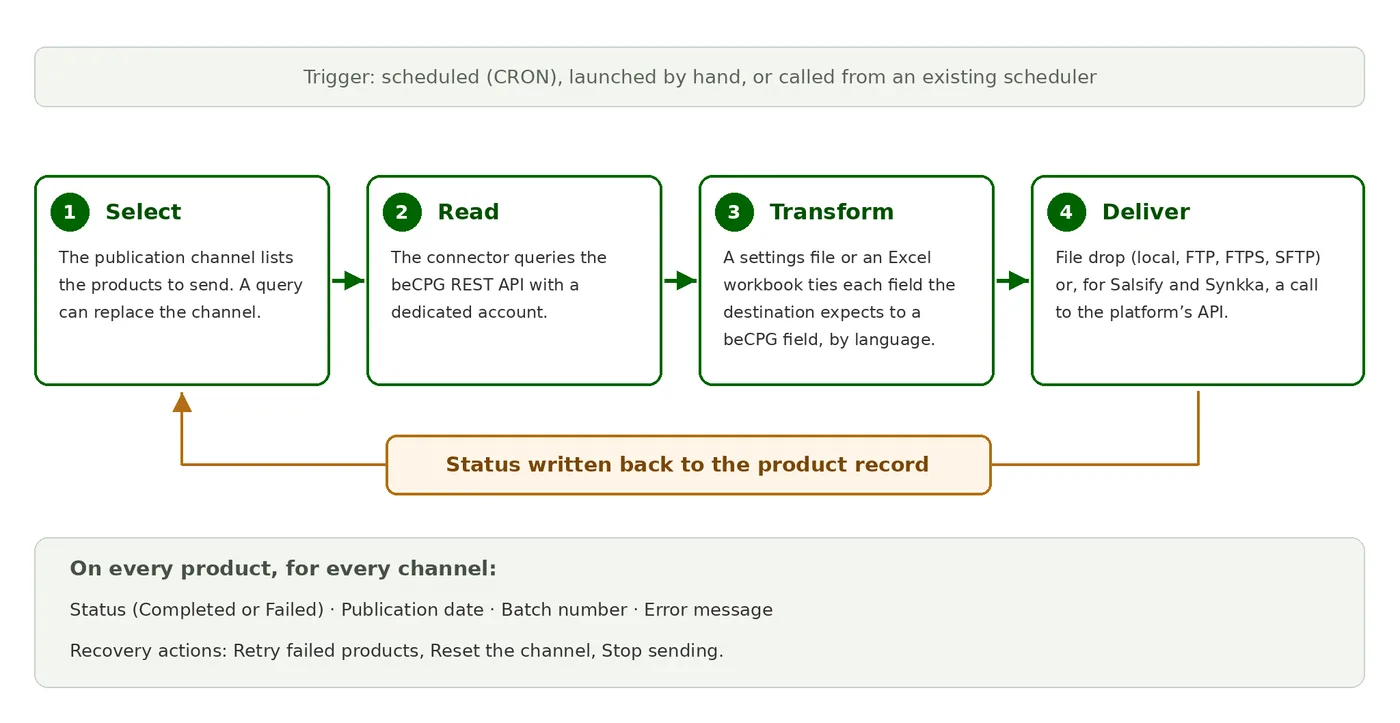
The mapping is declared in a settings file or an Excel workbook: each field the destination expects is tied to a beCPG field, language by language. Delivery is a choice: a file dropped locally, over FTP, FTPS or SFTP, or, for Salsify and Synkka, a direct call to the platform’s API. The frequency is scheduled, and a failure sends an email. For the most part these are not lines of code: they are settings, and they can be read back.
Knowing what went out, when, and why it failed
That leaves the opening question: who received what. beCPG answers it with publication channels. A channel is a destination — the GDSN, an ERP, a retailer platform. You attach the relevant products to it, and on every run the connector writes the outcome straight back onto the product record. It can also update the record after sending, for example by changing the product’s state. For catalogs, the identifier assigned by the platform comes back into beCPG.

It reads at a glance. Two channels are green, a third has failed, and the reason is spelled out: the country-of-origin code is missing for the target market. This is no longer an anonymous rejection landing in a mailbox three days later — it is a fact written on the record, visible to the person who can fix it. Once the field is filled in, three actions are enough: Retry the failed products, Reset the channel to send everything again, or Stop sending for an item withdrawn from the catalog.
The same mechanism carries the distribution of the GS1 product record: same channels, same tracking, simply one more destination.
Three ways to exchange data, and who does what
Connectors cover publication. For the rest, beCPG relies on two other mechanisms of the standard product: the REST API, to synchronize the ERP in real time in both directions (an approved record goes out, costs come back), and bulk import from Excel or CSV, for data migration and mass updates, with a dry run that reports errors before loading. All these exchanges run over HTTPS and apply the permissions of the calling user.
For an ERP synchronization, beCPG builds its half of the interface: workshops, presentation of the entry points, configuration on the beCPG side and tests. Your team or your integrator handles orchestration, code mapping and monitoring, unless you hand the whole interface to beCPG. Transformation rules stay on the interface side, which keeps upgrades simple, and the mapping between beCPG codes and ERP codes keeps every item unique.
Where to start
There is no need to plug everything in at once. Take the destination that costs you the most manual rework today — usually the first retailer platform or the GDSN — and handle that one alone. The rest follows the same path, channel by channel.
A PLM that does not talk to the rest of the information system ends up as one more file. The full list of connectors and their settings is described in the beCPG documentation. To look at your own case, get in touch.