
Excel spreadsheets cost nothing to set up. That is precisely what makes their true cost so difficult to see. It does not appear as a line in your budget. Instead, it is spread across the hours spent by formulators, the checks carried out before each document is sent and the rework required after an error.
Before considering a different way of working, you first need to understand what spreadsheets are really costing you. Here is how to measure it using your own figures.
Costs that are difficult to identify
Excel has clear advantages: you can start using a spreadsheet immediately and adapt it to the way you work. For ten product references managed by one person, it is often the right tool.
Problems usually start when the product range grows and several people begin working with the same data. Teams rarely measure this lost time because it is scattered across their daily work. A few minutes spent looking for the latest version of a formula. An extra check before sending a technical data sheet. Supplier data copied into several files. Or a label that needs updating after a product change.
Four areas to measure
Four areas are relatively easy to track: data re-entry, verification, information searches, and rework caused by errors.
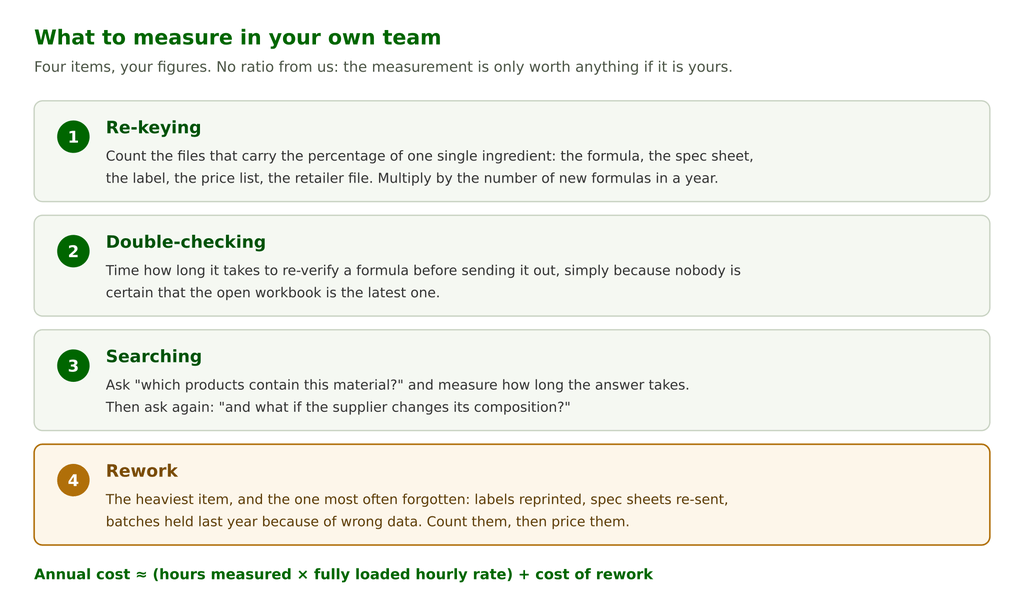
The fourth is often overlooked, yet it can also be the most costly. A label that needs to be reprinted, a document that has to be sent back to a customer, or a batch put on hold while waiting for a check: these events may be rare, but they are expensive. They can result from incorrect or outdated data, or information copied into the wrong place.
When Excel starts to show its limits
There is no exact number of product references at which Excel suddenly becomes unsuitable. Problems tend to appear when the amount of data increases and several people need to access or modify it:
- more than one person edits the formulas and you no longer know which version is correct
- the same file exists in three different versions, two of them sitting in email inboxes
- a supplier changes the composition of a raw material, and identifying all the affected formulas takes an entire day
- you need to prove who changed what and when
In the cosmetics industry, this last point goes beyond internal organization. Regulation (EC) No 1223/2009 requires companies to maintain a Product Information File, keep it up to date and make it readily accessible to the competent authorities. A spreadsheet that gives you no clear record of who changed it the previous week does not provide much of an audit trail.
What changes with a product repository in beCPG
The value of a product repository becomes particularly clear when data changes. Instead of manually searching through individual files to identify affected products, teams can directly identify all the formulations concerned.
In beCPG, a raw material such as glycerin has a single record in the repository rather than being copied across multiple files. Its price, INCI name, supplier and technical characteristics are all centralized in one place.
When teams use the raw material in several formulations, they can directly identify the products that contain it. If its composition, price or another piece of information changes, they can quickly find the formulas that need to be reviewed.
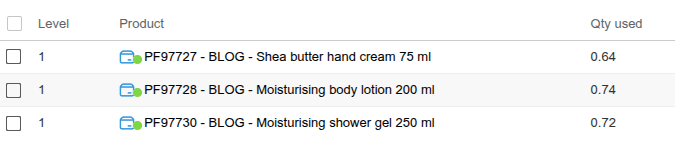
Because beCPG calculates finished product data from the formulation, teams can also recalculate costs, ingredient lists, allergens and nutritional data when the underlying information changes.
Moving from Excel to a PLM without starting from scratch
Moving from Excel-based management to a product repository does not mean abandoning all your existing data or migrating everything at once.
Your existing files can provide the starting point for building the repository in beCPG. You can migrate progressively, starting with raw materials and suppliers before moving on to formulations and active products.
Your existing files remain the starting point: their columns can map to fields in the repository, making it easier to import the data. But there is one important precaution: do not migrate your mistakes. Migration also gives you an opportunity to review data quality, identify duplicates, check outdated information and standardize data before importing it.
Starting with a clean repository can save years of uncertainty. We also discussed this in our article on the quality and completeness of product data.
Want to see what a product repository could change in your day-to-day work? Contact us
