Every new raw material arrives with its supplier technical sheet. Often sent as a PDF, it contains much of the information your product repository needs: shelf life, technical characteristics, allergens, certifications and storage conditions.
Yet this information stays locked in the document until it is entered into usable fields. Between the PDF received and the structured data, someone still has to find the information, check it and enter it.
How can you use the content of supplier technical sheets more easily, without spending your time going through documents?
A PDF is not data
A technical sheet can be complete, dated and approved. As long as its information stays in the PDF, the product repository cannot use it. A shelf life written in a document, for example, cannot be used in a check or a report until it is entered in the matching field.
Manual entry takes time and sometimes leads to entering only what is needed in the short term. The rest stays in the document, until the day it has to be found again for an audit, a customer request or a supplier change.
What to look for in a supplier technical sheet
A supplier technical sheet is a long document of which you use only a small part. Depending on the raw material and the supplier, some information comes up again and again:
- the total shelf life and the remaining shelf life guaranteed on delivery, two different values that are often confused;
- storage conditions and, where relevant, food contact information;
- physico-chemical limits (moisture, acidity, peroxide value) and the associated analytical method, needed to interpret the results correctly;
- the allergen declaration, in particular the substances or products listed in Annex II to Regulation (EU) No 1169/2011;
- site certifications and their expiry dates.
This information can be structured in the product repository. The difficulty is mainly to find it in the supplier documents and to enter it in the matching fields.
Ask the document instead of reading it
In beCPG, documents can be attached directly to the item they describe, so the technical sheet stays linked to its raw material.
The built-in AI assistant can then be asked about the content of the document to find a precise piece of information: a shelf life, a storage condition, a value or an analytical method.
The point is to find the information faster while keeping a link to the source document, so that it can be checked.
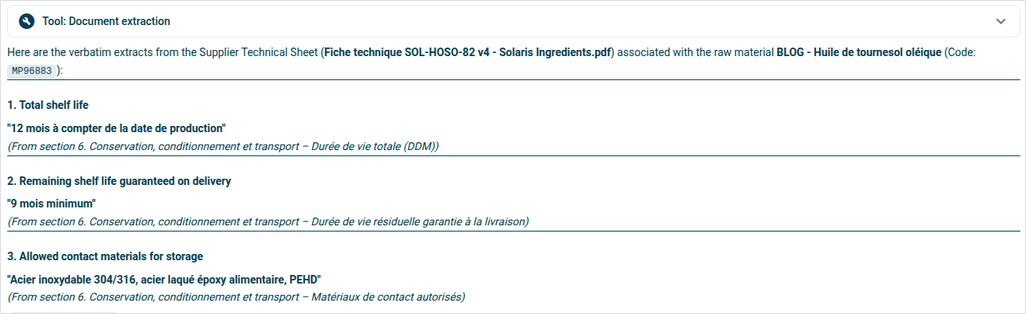
Keeping the source also makes later checks easier: the answer quotes the document the values come from and can give, for each one, the section it was taken from. Checking then takes a few seconds instead of a full re-read.
Information found still has to be validated
Finding information in a document is not enough to make it usable data in the PLM. As long as it is not entered in the matching field, it cannot be used in calculations, checks or generated documents.
The AI assistant makes finding the information easier, but validation remains an important step. The user can check the value in the source document before adding it to the repository.
The assistant can also propose the values to enter directly: allergens, microbiological criteria, nutrients or physico-chemical values are shown by section, with a confidence level. Nothing is recorded until the user applies them.
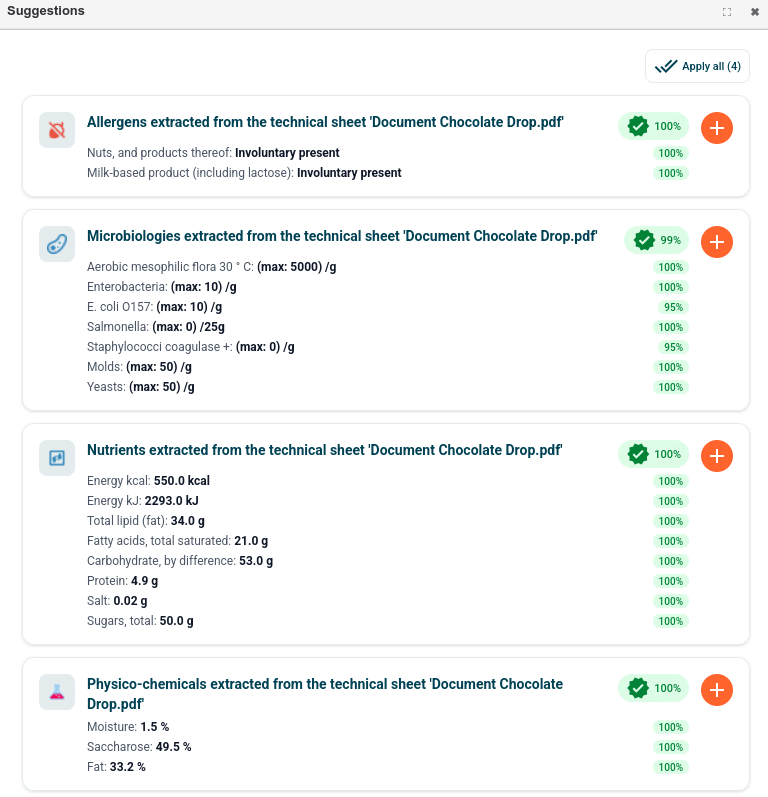
Once validated and structured, the data can be used by beCPG’s processes.
Where to start
The first step is to attach technical sheets to the raw materials they describe, so that the source document is easy to find.
Then list the information your repository really needs: shelf life, allergens, physico-chemical characteristics, certifications or storage conditions, for example.
Finally, version management remains essential. When a supplier sends a new technical sheet, the information used must be checked against the latest version of the document. beCPG can also automate the documents you send to your customers: we cover this in our article on the automatic generation of data sheets.
If your suppliers can enter their data themselves, the supplier portal does this work at the source: see our guide Supplier portal for raw material data: questions and answers.
Want to see it on your own documents? Contact us and we will show you the whole path on a real case.