
How do you build your own calculation rules into formulation?
Every product category has its own indicators: moisture on a fat-free basis for cured meats, protein-to-fat ratio, target sugar content, the cost of a trial batch. Kept in a spreadsheet next to the recipe, they are wrong as soon as the recipe changes. Built into formulation, they are recalculated with every change, just like costs and nutrition facts.
Why your indicators belong in the recipe
Formulation software calculates costs, nutrition facts, allergens, the ingredient list and physico-chemical data out of the box. Your own decision criteria often go further. A meat processor tracks moisture in the lean product, a bakery a target sugar content, an R&D team the quantity of each raw material for a series of lab trials.
When these indicators are calculated by hand, three problems appear:
- they are not updated when a raw material or a quantity changes;
- each formulator keeps their own version of the calculation;
- nobody knows which version of the recipe the figure was based on.
Which calculations should you add?
Useful rules combine data that formulation already knows: nutrients, costs, quantities, yield. Here are common examples, with the product category that uses them:
| Indicator | Calculation rule | Typical use |
|---|---|---|
| Collagen-free protein on a fat-free basis | (% total protein − % collagen) × 100 / (100 − % fat) | Cured and cooked meats |
| Moisture on a fat-free basis | (% water × 100) / (100 − % fat) | Cured and cooked meats |
| Moisture on a fat- and starch-free basis | (% water × 100) / (100 − % fat − % starch) | Meat products containing starch |
| Fat losses | 5 % process loss on fat | Cooked or processed products |
| Profit, yield | From costs and net quantities | All recipes |
| Quantity for 10 trials | Quantity of each component per trial batch × number of trials | Preparing lab trials |
A rule can also adjust the recipe itself: work out the quantity of water or milk, target an alcohol content and a sugar content, calculate net weight from the volumes used, or convert between volume, weight and pieces.
Dynamic characteristics and dynamic columns in beCPG
In beCPG, these rules are called dynamic characteristics. You add them in the "Dynamic characteristics" panel of the "Composition" list. The formula editor lets you pick the list, the characteristic and the field, for example Nutrients > Salt > Value. The result is recalculated every time you click "Formulate".
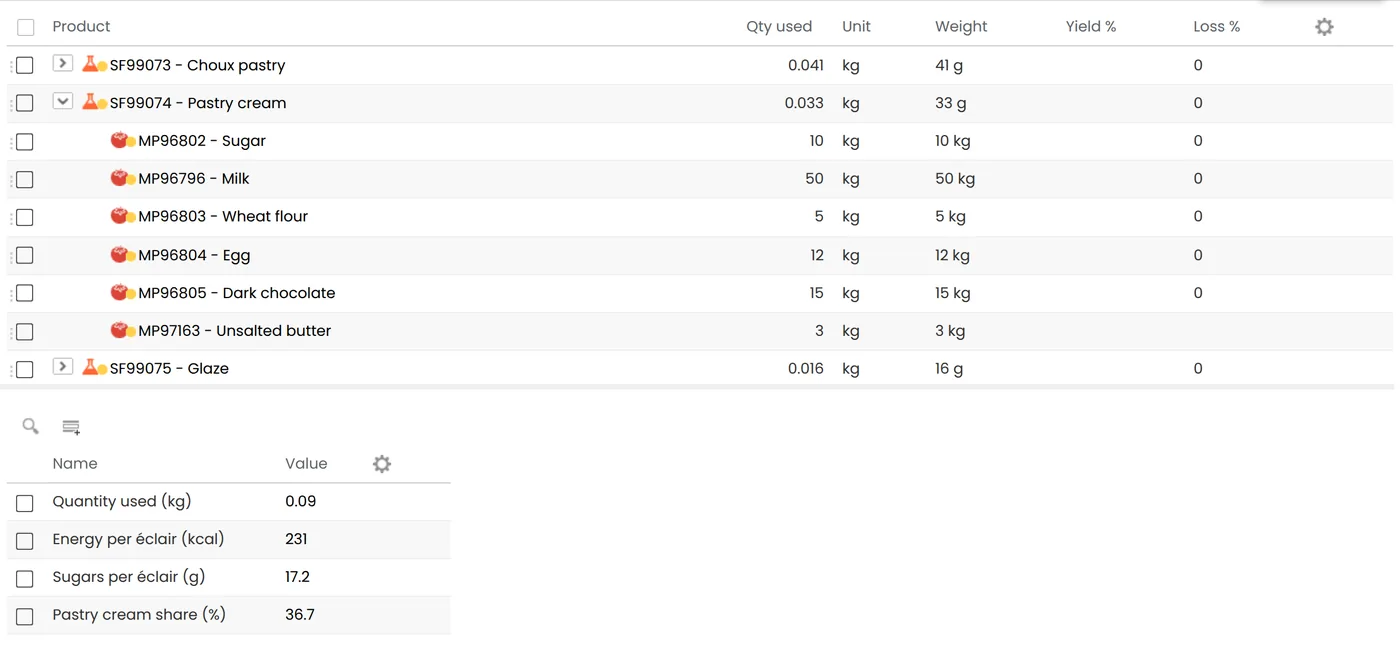
Each characteristic has a synchronization mode. In Synchronized mode, a corrected formula applies to every product that uses it. In Manual mode, it stays specific to one product. Rules placed on the template of a product type, such as "ready meal" or "pastry", apply to every new product created from that template.
Dynamic columns show a calculation on each line of the composition or packaging list: the cost of each raw material, the quantity per sample, the share of a component in the total cost. Ten columns are available, hidden by default.
Formulas are written in SpEL (Spring Expression Language). A simple rule is built in the editor. More advanced formulas require some programming knowledge: the SpEL formula documentation gives the syntax and examples.
See where a result comes from
A figure nobody can explain ends up being ignored. For each calculated characteristic (costs, nutrients, physico-chemical data), the calculation detail shows which components contribute to it, as a pie chart, a bar chart or a table. The formulator sees at once which raw material drives salt or cost up.
The same mechanism can display a front-of-pack score such as the Nutri-Score, with its calculation detail, next to your own indicators. For the score itself, see our Nutri-Score guide.
Your own indicators deserve the same rigor as nutrition facts: one definition, recalculated with every change. Book a demo on one of your recipes.
Read more: discover formulation and R&D in beCPG PLM, and our posts on recipe cost control and the real cost of managing formulas in Excel.
Frequently asked questions
Do you need to be a developer to add a calculation rule?
Not for a simple rule: the formula editor lets you pick the list, the characteristic and the field, then combine values with operators. Dynamic columns and advanced formulas are written directly and require some programming knowledge.
What happens when I correct a formula that is already in use?
In Synchronized mode, the new formula applies to every product that uses it. In Manual mode, only the recipe concerned changes.
When are dynamic characteristics recalculated?
Every time the product is formulated, together with costs, nutrients and allergens. The result therefore always reflects the latest version of the recipe.
Can different product families have different rules?
Yes. Rules placed on the template of a product type apply to the products created from that template. You can have calculations specific to meat products, pastry or beverages.