SPEL Formula
Some knowledge of Java / JavaScript programming is required.
Formulation often requires SpEL formulas to calculate results (for example, the production cost of a product or its energy value).
This page describes how to create these formulas in the system, and gives examples of simple and complex formulas that calculate a result automatically.
Formulas Location
Formulas can be found in two main places:
- The list of administration characteristics, e.g. for nutrients, physico-chemical characteristics, etc.
- The list of dynamic characteristics of a product/entity model.
But you can also find them in:
- Labeling rules on a product / entity model
- A .spel file linked to an entity model
- Catalogs
- Search exports
- Connectors
SPEL Context in beCPG
SPEL formulas are used in several contexts.
Formulation
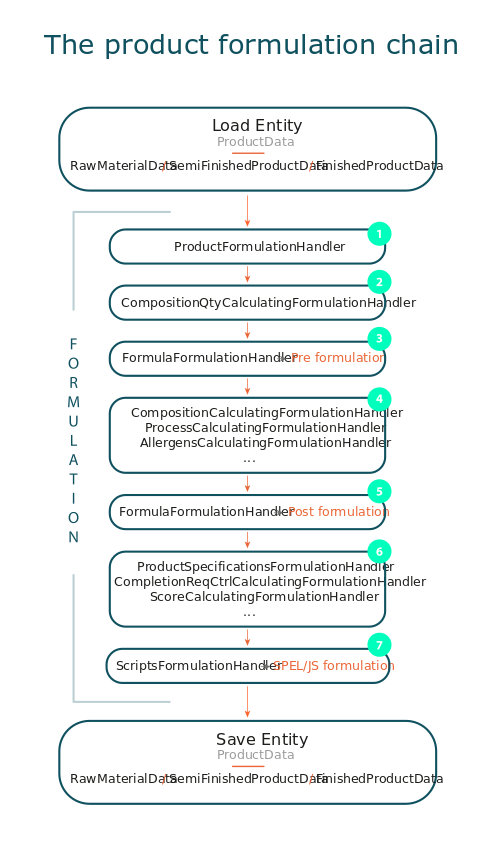
Formulation is the main context where SPEL formulas are used, so it's important to understand the formulation chain and when formulas are triggered. The main goal of the formulation chain is to load an entity from the Alfresco models and apply several transformations to it. At the end, the entity object is saved.
There are several formulation chains, for example one for projects and one for products. In the product formulation chain, we load a Java object inheriting from ProductData (RawMaterialData/ SemiFinishedProductData/ FinishedProductData), then we apply the corresponding formulation chain. At the end, the ProductData is saved.
Important: at the end of the formulation, the engine can decide to keep the ProductData in memory only (for example, for OM simulation). Do not save data during the process: in SPEL formulas, only manipulate the productData.
Most SPEL functions require the formula context, that is, the element the formula works on.
#thisdisplays the current entityentitydisplays the productData type context of the formula.dataListItemdisplays the line of a datalist, for example a line of the composition.dataListItemEntitydisplays the entity (type ProductData) associated with a line of the datalist, for example the Raw material in a composition list.variantDatadisplays the variant linked to a line of the composition list, packaging list, etc.compoList[0].productdisplays the entity of the first composition line
Formulation context
| Context variable | Description |
|---|---|
| #root | entity being formulated |
Pre/post composition/packaging/process column formulation context
| Context variable | Description |
|---|---|
| entity | entity being formulated |
| dataListItem | item row being formulated (compoList/packagingList/processList) |
| dataListItemEntity | entity associated with the list (compoListProduct/packagingListProduct/ resourceProduct) |
Cost/Nut/Physico/Claim formulation context
| Context variable | Description |
|---|---|
| entity | entity being formulated |
| dataListItem | item row being formulated (compoList/packagingList/processList) |
Labeling context
Prefs or Render rules:
| Context variable | Description |
|---|---|
| #root | LabelingFormulaContext Java object |
| entity | entity being formulated |
Labeling filter rules:
| Context variable | Description |
|---|---|
| #root | LabelingFormulaFilterContext Java object |
| compoListDataItem | CompoListItem Java object to test the filter on |
| ingListDataItem | IngListItem Java object to test the filter on |
| ingTypeItem | IngTypeItem Java object to test the filter on |
| entity | entity being formulated |
| dataListItem | Alias for compoListDataItem |
| isClaimed(claimNodeRef) | Check for claim on ingredient or product |
Catalog SPEL context
Same context as formulation.
JXLS report context
Same context as formulation.
Export search context
| Context variable | Description |
|---|---|
| #root | DefaultExcelReportSearchPlugin.FormulaContext Java object |
| prop | Array of extracted properties, i.e. props["bcpg:code"] |
No access to the entity or to custom SPEL functions.
Connector SPEL context
| Context variable | Description |
|---|---|
| #root | StandardCSVVisitor.FormulaContext Java object |
| prop | Array of extracted properties, i.e. props["bcpg:code"] |
No access to the entity or to custom SPEL functions.
SPEL Language
The Spring Expression Language (SpEL) is a powerful expression language that supports querying and manipulating an object graph at runtime. It can be used in several places in beCPG.
There are several operators available in the language:
| Type | Operators | ||
|---|---|---|---|
| Arithmetic | +, -, *, /, %, ^, div, mod | ||
| Relational | <, >, ==, !=, <=, >=, lt, gt, eq, ne, le, ge | ||
| Logical | and, or, not, &&, \ | \ | , ! |
| Conditional | ?: | ||
| Regex | matches |
Operators
Arithmetic Operators
All basic arithmetic operators are supported.
| Formula | Result |
|---|---|
| 19 + 1 | 20 |
| 'String1 ' + 'string2' | "String1 string2" |
| 20 - 1 | 19 |
| 10 * 2 | 20 |
| 36 / 2 | 18 |
| 36 div 2 | 18, same as the / operator |
| 37 % 10 | 7 |
| 37 mod 10 | 7, same as the % operator |
| 2 ^ 9 | 512 |
| (2 + 2) * 2 + 9 | 17 |
Divide and modulo operations have alphabetic aliases, div for / and mod for %. The + operator can also be used to concatenate strings.
Relational Operators
All basic relational and logical operations are also supported.
| Formula | Result |
|---|---|
| 1 == 1 | true |
| 1 eq 1 | true |
| 1 != 1 | false |
| 1 ne 1 | false |
| 1 < 1 | false |
| 1 lt 1 | false |
| 1 <= 1 | true |
| 1 le 1 | true |
| 1 > 1 | false |
| 1 gt 1 | false |
| 1 >= 1 | true |
| 1 ge 1 | true |
All relational operators also have alphabetic aliases. For example, in XML-based configs we can't use operators containing angle brackets (<, <=, >, >=). Instead, we can use lt (less than), le (less than or equal), gt (greater than), or ge (greater than or equal).
Logical Operators
SpEL supports all basic logical operations:
| Formula | Result | ||
|---|---|---|---|
| 250 > 200 && 200 < 4000 | true | ||
| 250 > 200 and 200 < 4000 | true | ||
| ```400 > 300 | 150 < 100``` | true | |
| 400 > 300 or 150 < 10 | true | ||
| !true | false | ||
| not true | false |
As with arithmetic and relational operators, all logical operators also have alphabetic clones.
Conditional Operators or Ternary
Conditional operators are used for injecting different values depending on some condition:
"Test" ? "valeur si test vrai" : "valeur si test faux"
The ternary operator performs compact if-then-else conditional logic inside the expression. In this example, we check whether the condition is true or not.
ex: 2 == 1 ? true : false // false
Another common use for the ternary operator is to check if some variable is null and then return the variable value or a default:
ex : qty != null ? qty : recipeQtyUsed
The Elvis operator, used in the Groovy language, shortens the ternary operator syntax for the case above. It is also available in SpEL. The code below is equivalent to the code above:
ex : qty ?:0d > Injecte 0 si qty est null
Using Regex
The matches operator can be used to check whether or not a string matches a given regular expression.
| Formula | Result |
|---|---|
'100' matches '\d+' |
true |
'100fghdjf' matches '\d+' |
false |
'valid alphabetic string' matches '[a-zA-Z\s]+' |
true |
'invalid alphabetic string #nodeRef' matches '[a-zA-Z\s]+' |
false |
someBean.someValue matches '\d+' |
true if someValue contains only digits |
Variables
Variables can be referenced in the expression using the #variableName syntax. Variables are set using the var keyword:
var myVar = "This is a test";
#myVar // This is a test
The #this and #root variables
The variable #this is always defined and refers to the current evaluation object (against which unqualified references are resolved). The variable #root is always defined and refers to the root context object. Although #this may vary as components of an expression are evaluated, #root always refers to the root.
Accessing beCPG Java Field
With SpEL, you can access the contents of any Java object in the formulation context. For example, in product formulation, you have access to the ProductData object:
public class ProductData {

     NodeRef hierarchy1;
     NodeRef hierarchy2;
     MLText legalName;
     MLText pluralLegalName;
     String title;
     String erpCode;
     SystemState state | SystemState.Simulation;
     ProductUnit unit | ProductUnit.kg;
     ProductData entityTpl;
     List<NodeRef> plants | new ArrayList<>();
     Double qty;
     Double density;
     Double yield;
     Double manualYield;
     Double secondaryYield;
     Double yieldVolume;
     Double netWeight;
     Double weightPrimary;
     Double netWeightSecondary;
     Double weightSecondary;
     Double netWeightTertiary;
     Double weightTertiary;
     Boolean dropPackagingOfComponents;

    /*
     * DataList
     */
     List<AllergenListDataItem> allergenList;
     List<CostListDataItem> costList;
     List<PriceListDataItem> priceList;
     List<IngListDataItem> ingList;
     List<NutListDataItem> nutList;
     List<OrganoListDataItem> organoList;
     List<MicrobioListDataItem> microbioList;
     List<PhysicoChemListDataItem> physicoChemList;
     List<LabelClaimListDataItem> labelClaimList;
     List<ControlDefListDataItem> controlDefList;
     List<LabelingListDataItem> labelingList;
     List<ResourceParamListItem> resourceParamList;
     List<ReqCtrlListDataItem> reqCtrlList;
     List<PackMaterialListDataItem> packMaterialList;

    /*
     * View
     */
     CompoListView compoListView | new CompoListView();
     ProcessListView processListView | new ProcessListView();
     PackagingListView packagingListView | new PackagingListView();
     LabelingListView labelingListView | new LabelingListView();

    /*
     * Variants
     */

     List<VariantData> localVariants;
     VariantPackagingData defaultVariantPackagingData;
     VariantData defaultVariantData;

    /*
     * Product specifications
     */

     List<ProductSpecificationData> productSpecifications;
     List<ClientData> clients;

    /*
     * Origin geo
     */

     List<NodeRef> geoOrigins | new ArrayList<>();

    /*
     * Completion scores
     */
     String entityScore;
     List<String> reportLocales;
     List<ProductData> compareWithEntities;

}
To access member variables in SpEL, indicate the variable name:
| Formula | Result |
|---|---|
| title | "title value" |
| erpCode = "0001" | 0001 |
| clients[0] | nodeRef |
| compoListView.compoList[0] | CompoListDataItem |
| nutList.?[nut.toString() == 'nodeRef'].value | Nut list value |
You can also call any method available in the ProductData object:
isLiquid()
isRawMaterial()
isPackaging()
isPackagingKit()
isSemiFinished()
isLocalSemiFinished()
Collection Selection
Selection is a powerful expression language feature that allows you to transform some source collection into another by selecting from its entries.
| Alias | Expression |
|---|---|
| cost['nodeRef'] | costList.^[cost.toString() == 'nodeRef'] |
| nut['nodeRef'] | nutList.^[nut.toString() == 'nodeRef'] |
| allergen['nodeRef'] | allergenList.^[allergen.toString() == 'nodeRef'] |
| ing['nodeRef'] | ingList.^[ing.toString() == 'nodeRef'] |
| organo['nodeRef'] | organoList.^[organo.toString() == 'nodeRef'] |
| physicoChem['nodeRef'] | physicoChemList.^[physicoChem.toString() == 'nodeRef'] |
| microbio['nodeRef'] | microbioList.^[microBio.toString() == 'nodeRef'] |
| compo['nodeRef'] | compoListView.compoList.^[product.toString() == 'nodeRef'] |
| process['nodeRef'] | processListView.processList.^[resource.toString() == 'nodeRef'] |
| resParam['nodeRef'] | resourceParamList.^[param.toString() == 'nodeRef'] |
| pack['nodeRef'] | packagingListView.packagingList.^[product.toString() == 'nodeRef'] |
| packaging['nodeRef'] | packagingListView.packagingList.^[product.toString() == 'nodeRef'] |
| compoVar['name'] | compoListView.dynamicCharactList.^[title == 'name']?.value |
| packVar['name'] | packagingListView.dynamicCharactList.^[title == 'name']?.value |
| packagingVar['name'] | packagingListView.dynamicCharactList.^[title == 'name']?.value |
| processVar['name'] | processListView.dynamicCharactList.^[title == 'nodeRef']?.value |
| labelClaim['nodeRef'] | labelClaimList.^[labelClaim.toString() == 'nodeRef'] |
| labeling['nodeRef'] | labelingListView.ingLabelingList.^[grp.toString() == 'nodeRef'] |
Selection uses the .?[selectionExpression] syntax. It filters the collection and returns a new collection containing a subset of the original elements. For example, selection lets you get a list of CostListDataItem:
| Formula | Result |
|---|---|
| costList.?[cost == 'Cost MP'] | Array of costs where cost nodeRef = 'Cost MP' |
| costList.?[value<27] | Array of costs where value < 27 |
In addition to returning all the selected elements, you can retrieve only the first or the last value. To get the first entry matching the selection, the syntax is ^[…]; to get the last matching entry, the syntax is $[…].
| Formula | Result |
|---|---|
| costList.^[cost == 'Cost MP'] | First cost matching |
| costList.$[cost == 'Cost MP'] | Last cost matching |
Collection Projection
Projection lets a collection drive the evaluation of a sub-expression; the result is a new collection. The syntax for projection is ![projectionExpression]. For example, suppose we have a list of costs but want the list of cost values. We want to evaluate 'value' for every entry in the cost list. Using projection:
| Formula | Result |
|---|---|
| costList.![value] | returns [ '5', '25' ] |
Formula editor
The formula editor is a text area with numbered lines, and two tables below it.
Generalities on a simple formula
Most of the time, SpEL formulas display a single result: the last calculated expression. This means that you can use intermediate variables in a calculation, as long as the variable containing the final result is called at the end of the formula.
For example, the following formula returns the result stored in the result variable:
    var result = qty;
    var yieldCoeff = (yield/100);
    #result = #result / #yieldCoeff;
    #result;
However, most formulas have a single expression and do not need intermediate variables. The previous expression can then be shortened:
qty / (yield/100)
One of the main limitations of the SpEL language is the absence of if ... else conditions. You need to use ternary structures, which can pile up and make the formula hard to read.
e.g. Salt quantity calculation (based on sodium quantity):
nut['Sodium'].value == null ? 0d : nut['Sodium'].value * 2.5 / 1000
(Sodium is here the nodeRef of the nutrient Sodium)
The formula first checks that the Sodium value is not null. If it is null, the formula displays 0.
Most reads of property or calculated values must include a default value, in case the value is missing. This value must have the d (or D) suffix to tell the system that the number is a decimal and not a character (example: 1d is a decimal number, while 1 can represent the integer 1 or the text character "1").
Multiplications work with 0d, but divisions need 1d, and formulas that display text need "" as default value. Use these values in conditional formulas.
Helpers SPEL
The CTRL + SPACE shortcut displays a help menu that gives quick access to the advanced functions.
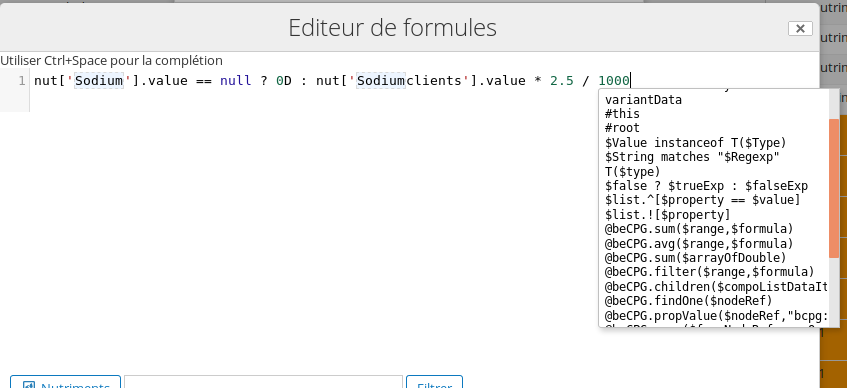
Dynamic characteristic
Dynamic characteristics can be calculated on a formulated product, or on every line of the linked list. Every list with components (packaging, composition, process) has its own dynamic characteristic list.
You can apply a formula to all elements of a datalist by choosing a column. The results are then displayed in a column.
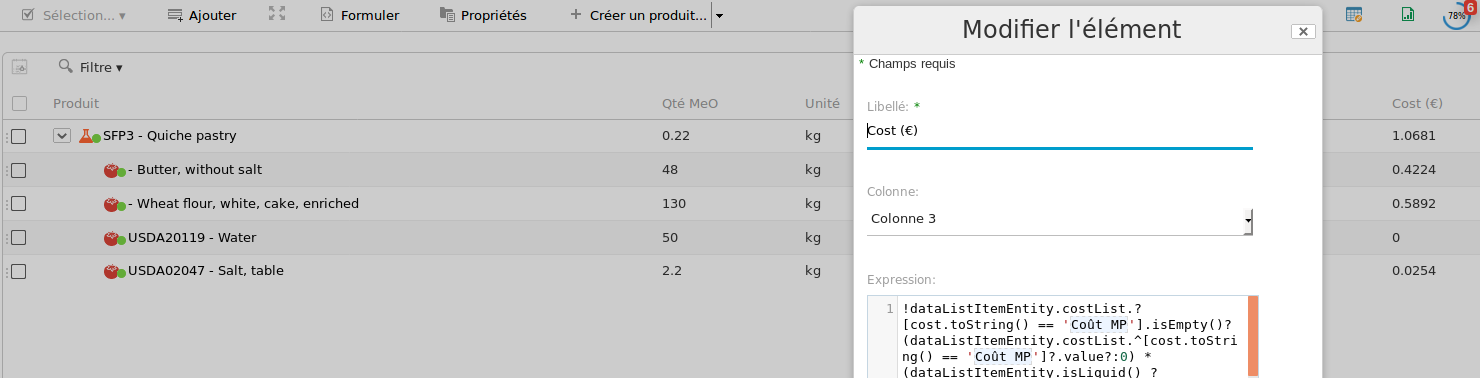
e.g. "Costs (€)" is calculated for every component of the list.
Characteristics
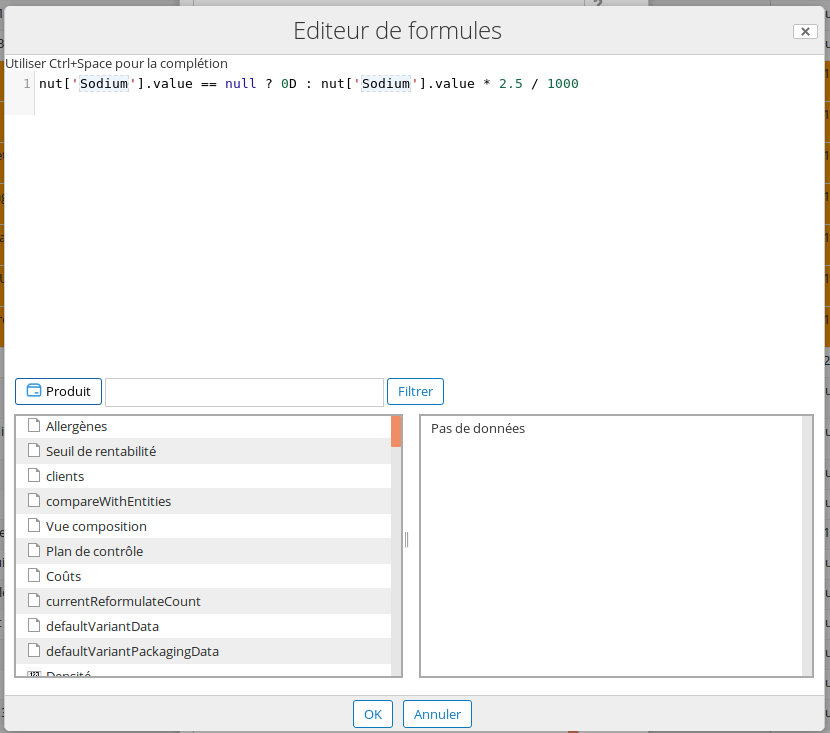
The tables under the text area let users select formula fragments and insert them at the cursor position.
Choose elements on the left, and the information to display for these elements on the right (value, minimumValue, etc.).
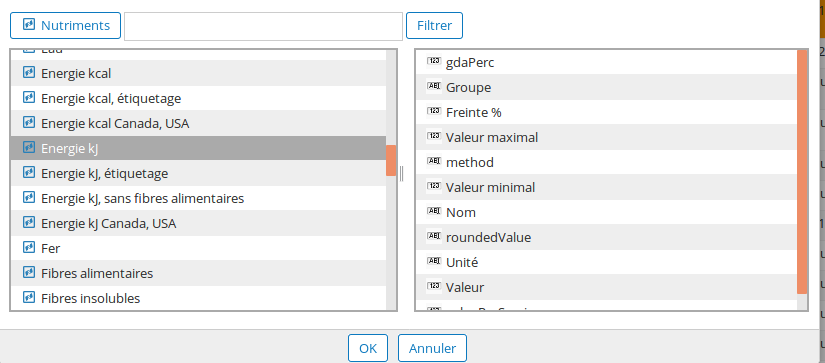
Advanced
beCPG SPEL custom functions
beCPG defines a set of custom functions available in SPEL formulas.
The syntax to use these functions is @beCPG.function.
| Functions | Description |
|---|---|
| propValue | Displays a property. |
| setValue | Sets the value of a property. |
| assocValue | Displays the nodeRef value of an association |
| assocValues | Displays the values of a multiple association as an array. |
| setAssocs | Sets one or several association values. |
| assocPropValues | Displays properties from the associations extracted. |
| assocAssocValues | Displays associations from the associations extracted. |
| propMLValue | Extracts a multilingual property in the specified locale, or all its translations |
| propMLConstraint | Extracts a multilingual property with a constraint in the specified locale, or all its translations |
| updateMLText | Sets a locale value of a multilingual text. |
| setMLValue | Sets a locale value of a multilingual attribute. |
| copy | Copies associations and/or lists from a source to the current product. |
| applyFormulaToList | Applies a formula to a list, like a dynamic column. |
| filter | Filters a list. Generally combined with other formulas, like min, max, avg or sum. |
| max | Finds the maximum value of an array. |
| min | Finds the minimum value of an array. |
| avg | Finds the average value of an array. |
| sum | Sums the values of an array. |
| children | Gets the children of entity, to go down the composition levels. |
| findOne | Gets the entity designated by the nodeRef |
| sourcesAssocValues | Displays the where-used nodeRef array, based on a target association. |
| formatNumber | Specifies the number format (e.g. number of decimals) |
| formatDate | For dates, you can specify the format |
| toString() | To convert values to text |
| isSemiFinished() or .isRawMaterial() or .isFinishedProduct() | Tests the entity type |
| copyProps | Copies properties from a source to a target |
| copyAssocs | Copies associations from a source to a target |
| removeDuplicates | Removes duplicates from an array |
| join | Converts an array into a string with a defined separator |
Warning: if Java fields are available, functions such as propValue, assocValue, setValue and assocValues do not work. e.g.: @beCPG.propValue(#this, “bcpg:productQty”) is equivalent to the Java field “qty”. For more information on Java fields, see Accessing beCPG Java Field.
Example
- propValue: displays a property.
We want to extract the custom:name field from the entity with a fixed dynamic characteristic.
@beCPG.propValue(#this,"custom:name")
We want to extract the custom:code field from the entities of a list with a characteristic in a column.
@beCPG.propValue(dataListItemEntity,"custom:code")
You want to extract the value of a hierarchical family (d:noderef). In this case, propValue must be typed twice:
@beCPG.propValue(@beCPG.propValue(#this,"bcpg:productHierarchy1"),"bcpg:lkvValue")
- setValue: sets the value of a property.
Set "kg" in custom:productUnit:
@beCPG.setValue(#this,"custom:productUnit","kg")
We want to assign the custom:description value to the custom:legalName field:
@beCPG.setValue(#this,"custom:legalName",@beCPG.propValue(#this,"cm:description"))
- assocValue: displays the nodeRef value of an association.
Displays the trademarkRef association:
@beCPG.assocValue(#this,"bcpg:trademarkRef")
- assocValues: displays the values of a multiple association as an array.
We want to extract the multiple association "bcpg:productGeoOrigin":
@beCPG.assocValues(#this,"bcpg:productGeoOrigin")
Note that you can extract the first element with [0]:
@beCPG.assocValues(#this,"bcpg:productGeoOrigin")[0]
Which is equivalent to:
@beCPG.assocValue(#this,"bcpg:productGeoOrigin")
- setAssocs: sets one or several association values.
We want to set the plant with nodeRef "workspace://SpacesStore/169a0cf8-2f0a-4011-9b19-dea14676e136" to the "bcpg:plant" association:
@beCPG.setAssocs(#this,"bcpg:plants", "workspace://SpacesStore/169a0cf8-2f0a-4011-9b19-dea14676e136")
We want to add the client with nodeRef "workspace://SpacesStore/844aa160-f344-43be-a659-434d319e584f" to the "bcpg:clients" association:
var clients = @beCPG.assocValues(#this,"bcpg:clients");
#clients.add("workspace://SpacesStore/844aa160-f344-43be-a659-434d319e584f");
@beCPG.setAssocs(#this,"bcpg:clients", #clients)
- assocPropValues: displays properties of the extracted associations.
We want to extract the title of the clients:
@beCPG.assocPropValues(#this,"bcpg:client","cm:title")
- assocAssocValues: displays associations of the extracted associations.
We want to extract bcpg:plantCertifications from bcpg:plant:
@beCPG.assocAssocValues(#this,"bcpg:plant","bcpg:plantCertifications")
- propMLValue: extracts a multilingual property in the specified locale.
We want to extract the bcpg:legalName in US English:
@beCPG.propMLValue(#this,"bcpg:legalName","en_US")
We want to extract all the translations of bcpg:legalName:
@beCPG.propMLValue(#this,"bcpg:legalName",null)
- propMLConstraint: extracts multilingual properties with a constraint in a specified language.
@beCPG.propMLConstraint(@beCPG.propValue(#this,"gs1:packagingTypeCode"), "gs1:packagingTypeCode", "fr")
- updateMLText: sets a locale value of a multilingual text.
We want to set the Finnish legalName to "Finnish Legal Name":
@beCPG.updateMLText(legalName,"fi","Finnish Legal Name")
Warning: this works for multilingual fields as helpers only. Otherwise, use setMLValue.
- setMLValue: sets a locale value of a multilingual attribute.
We want to set the German description attribute to "German Description":
@beCPG.setMLValue(#this, "cm:description", "de", "German Description")
- copy: copies associations and/or lists from a source to the current product.
The function works like this:
@beCPG.copy(sourceNodeRef, assocToCopyList, listToCopyList)
We want to copy the associations "bcpg:trademarkRef","bcpg:subsidiaryRef","bcpg:clients", and "bcpg:suppliers" from the first entity of the compoList:
@beCPG.copy(compoList[0].product,{"bcpg:trademarkRef","bcpg:subsidiaryRef","bcpg:clients","bcpg:suppliers"},"")
We want to copy the microbioList from the productMicrobioCriteriaRef association:
var productMicrobioCriteriaRef = @beCPG.assocValue(#this,"bcpg:productMicrobioCriteriaRef");
@beCPG.copy(#productMicrobioCriteriaRef,"",{"bcpg:microbioList"})
We want to copy the list and properties from the parent entity:
@beCPG.copy(parentEntity,{"bcpg:legalName", "bcpg:productHierarchy1", "bcpg:erpCode"},{"bcpg:compoList","bcpg:packagingList","mpm:processList"})
- applyFormulaToList: applies a formula to a list, like a dynamic column.
We want to set compoListQtySubFormula of compoList to 0:
@beCPG.applyFormulaToList(getCompoList(),"@beCPG.setValue(dataListItem,'bcpg:compoListQtySubFormula', 0d)")
This works on most standard lists, like:
- getCompoList() ( or compoList )
- getPackagingList() ( or packagingList )
- getProcessList() ( or processList )
- getControlDefList() ( or controlDefList)
- priceList
- costList
- reqCtrlList
You can have several formulas in the same applyFormulaToList, separated by "\;":
@beCPG.applyFormulaToList("formula1\;formula2")
- filter: filters a list. Generally combined with other formulas, like min, max, avg or sum.
We want to find the reqCtrlList elements that have a reqMaxQty value and are not of the "Info" type:
@beCPG.filter(reqCtrlList, "reqMaxQty!=null && reqType.toString() !='Info'")
We want to extract the compoList elements of the main variant that have a qty > 0.5 kg:
@beCPG.filter(getCompoList(new fr.becpg.repo.variant.filters.VariantFilters(true)), "dataListItem.qty > 0.5")
- max: finds the maximum value of an array:
@beCPG.max($arrayOfDouble)
We want to find the maximum reqMaxQty of the reqCtrlList:
@beCPG.max(reqCtrlList.![reqMaxQty])
We want to find the maximum qty of the compoList:
@beCPG.max(compoList.![qty])
- min: finds the minimum value of an array:
@beCPG.min($arrayOfDouble)
We want to find the minimum among the reqCtrlList elements that have a reqMaxQty and are not of the "Info" type:
@beCPG.min(@beCPG.filter(reqCtrlList, "reqMaxQty!=null && reqType.toString() !='Info'").![reqMaxQty])
- avg: finds the average value of an array:
@beCPG.avg($arrayOfDouble)
- sum: sums the values of an array.
@beCPG.sum(range, formula)
You can sum the elements of a datalist:
@beCPG.sum(getCompoList(new fr.becpg.repo.variant.filters.VariantFilters(true)),dataListItem.qty)
We add the filter to consider only the quantity of the composition elements of the default variant. We can go further and take into account only the quantity of the components that are not local Semi-finished products.
@beCPG.sum(
    @beCPG.filter(
        getCompoList(new fr.becpg.repo.variant.filters.VariantFilters(true)),
        !(dataListItemEntity instanceof T(fr.becpg.repo.product.data.LocalSemiFinishedProductData))
    ),
    dataListItem.qty
)
The functions isLiquid() to isLocalSemiFinished() are shortcuts that avoid using instanceof, as in the last formula.
Second example: you want to sum the elements of a dynamic column. Here is the formula, using column 7 of the composition as an example:
@beCPG.sum(compoList, "@beCPG.propValue(dataListItem,'bcpg:dynamicCharactColumn7')" )
- children: gets the children of
entity, to go down the composition levels.
@beCPG.children(entity)
- findOne: gets the entity designated by the
nodeRef.
@beCPG.findOne(nodeRef)
- sourcesAssocValues: displays the where-used nodeRef array, based on a target association.
We want the list of projects that use the current product:
@beCPG.sourcesAssocValues(#this,"pjt:projectEntity");
We want the number of products that use the current product in their composition:
var sources = @beCPG.sourcesAssocValues(#this,"bcpg:compoListProduct");
var size = #sources.size();
#size;
- updateDate: modifies a date value by adding days/weeks/months/years:
@beCPG.updateDate($date, $field, $amount )
We subtract 5 days from today's date:
@beCPG.updateDate(new java.util.Date(), T(java.util.Calendar).DAY_OF_MONTH, -5 )
We add 1 year to the creation date:
@beCPG.updateDate(@beCPG.propValue(#this, "cm:created"), T(java.util.Calendar).YEAR, 1 )
We add 3 months to the modified date:
@beCPG.updateDate(@beCPG.propValue(#this, "cm:modified"), T(java.util.Calendar).MONTH, 3 )
- formatNumber: specifies the format of numeric fields.
We want to display the protein nutrient with 2 significant digits:
@beCPG.formatNumber(nut['workspace://SpacesStore/d49d02aa-3443-48f8-b6ee-9e66fe2ba4c4']?.value, "0.##")
- formatDate: specifies the date format.
We want to display the month in which the product was last formulated:
@beCPG.formatDate(formulatedDate,"MM/YYYY")
@beCPG.formatDate(formulatedDate,"dd/MM/YYYY")
- toString: returns the data as text.
dataListItem.compoListUnit is of type ProductUnit, not String:
dataListItem.compoListUnit!=null && dataListItem.compoListUnit.toString()== 'g'
Displays the elements of the composition:
*#this.NodeRef.toString()
- isSemiFinished() or .isRawMaterial() or .isFinishedProduct(): tests the entity type.
entity.isSemiFinished() == true ||entity.isRawMaterial() == true || entity.isFinishedProduct()
- copyProps: copies property values from source to target.
@beCPG.copyProps(target, sourceNodeRef, "sourceProp1|targetProp1,sourceProp2|targetProp2")
- copyAssocs: copies association values from source to target.
@beCPG.copyAssocs(target, sourceNodeRef, "sourceAssoc1|targetAssoc1,sourceAssoc2|targetAssoc2")
- removeDuplicates: removes duplicates from an array.
@beCPG.removeDuplicates($array);
- join: converts an array into a string with a defined separator.
@beCPG.join($separator, $array )
Nutriscore formula (beCPG 4.0)
To extract the Nutri-Score details, first initialize the context as a variable:
var context = T(fr.becpg.repo.product.formulation.score.NutriScoreContext).parse(nutrientDetails);
Then you can extract a summary:
#context.toDisplayValue();
You can also extract details on each nutrient:
- getNutriScore()
- getEnergy()
- getSatFat()
- getTotalFat()
- getTotalSugar()
- getSodium()
- getPercFruitsAndVetgs()
- getNspFibre()
- getAoacFibre()
- getProtein()
You can also extract details on the Nutri-Score:
- getCategory()
- getNutrientClass()
- getClassLowerValue()
- getClassUpperValue()
- getAScore()
- getCScore()
From these, you can extract the following values:
- getLowerValue()
- getUpperValue()
- getScore()
- getValue()
For example:
#context.getProtein().getValue();
#context.getTotalSugar().getLowerValue();
#context.getAScore();
#context.getClassUpperValue();
Accessing Java types
The special 'T' operator specifies an instance of java.lang.Class (the 'type'). Static methods are also invoked with this operator.
T(java.util.Date)
T(String)
T(java.math.RoundingMode).CEILING < T(java.math.RoundingMode).FLOOR
Constructors
Constructors can be invoked using the new operator. Use the fully qualified class name for all types except primitive types and String (where int, float, etc. can be used).
Expression templating
Mainly used in labeling Render formulas. Expression templates mix literal text with one or more evaluation blocks. Each evaluation block is delimited by prefix and suffix characters that you can define; a common choice is #{ }. For example:
"random number is #{T(java.lang.Math).random()}"
Inline lists, maps and array construction
Lists can be expressed directly in an expression using {} notation. Maps can also be expressed directly in an expression using {key:value} notation. Arrays can be built using the familiar Java syntax, optionally supplying an initializer to have the array populated at construction time.
"{1,2,3,4}" // List construction
"{name:'Nikola',dob:'10-July-1856'}" // Map construction
"new int[]{1,2,3}" // Array construction
Examples of formulas
- This formula calculates the sum of the wheat and wheat flour percentages (in the ingredient list) of the product. ('Wheat' is the nodeRef, not text).
    (ingList.^[ing.toString() == 'Wheat']?.qtyPerc != null ? ingList.^[ing.toString() == 'Wheat']?.qtyPerc : 0d) +
    (ingList.^[ing.toString() == 'Wheat flour']?.qtyPerc != null ? ingList.^[ing.toString() == 'Blé']?.qtyPerc : 0d)
- This formula calculates the sum of dynamic column 2 for the components that are not local Semi-finished products.
@beCPG.sum(getCompoList(new fr.becpg.repo.variant.filters.VariantFilters()),
"dataListItemEntity instanceof T(fr.becpg.repo.product.data.LocalSemiFinishedProductData) ? 0d : @beCPG.propValue(dataListItem.nodeRef, 'bcpg:dynamicCharactColumn2')")
- Depending on the entity template of the component, this formula sums:
- the "Reconstitution Rate" property multiplied by the quantity of the composition line, if the template of the component is "Reconstituted FP";
- otherwise, the "Dry matter" physico-chemical characteristic of this component.
@beCPG.sum(getCompoList(), "@beCPG.findOne(dataListItemEntity).getEntityTpl() != 'Reconstituted FP' ? @beCPG.propValue(dataListItemEntity, "bcpg:reconstitutionRate") * dataListItem.qty : dataListItemEntity.physico['Dry matter']?.value")
- Gets today's date in the dd/MM/yyyy format.
new java.text.SimpleDateFormat("dd/MM/yyyy").format(new java.util.Date())
- Applies a custom number format.
new java.text.DecimalFormat("0.#").format(nut['Protein']?.value)
- Replaces the text "to replace" with "new text" in the cm:description field.
@beCPG.propValue($nodeRef,"cm:description").replaceAll("to replace","new text")
- Checks whether a claim is claimed.
entity.labelClaim['Kasher']?.isClaimed
- Extracts the text of the cm:name field after the first occurrence of a text string.
var productName = @beCPG.propValue(#this,"cm:name");
#productName.substring(#productName.indexOf("test"));
- Tests whether a text starts with a given string and displays true / false.
@beCPG.propValue(#this,"cm:name").startsWith("X");