User administration
User Administration allows you to create, organize and administer individual users. It includes the management of access rights, roles and permissions to ensure that each user has the appropriate level of authorization to access the software's features and information.
In beCPG, user administration is controlled via the admin tool available in the beCPG administration.
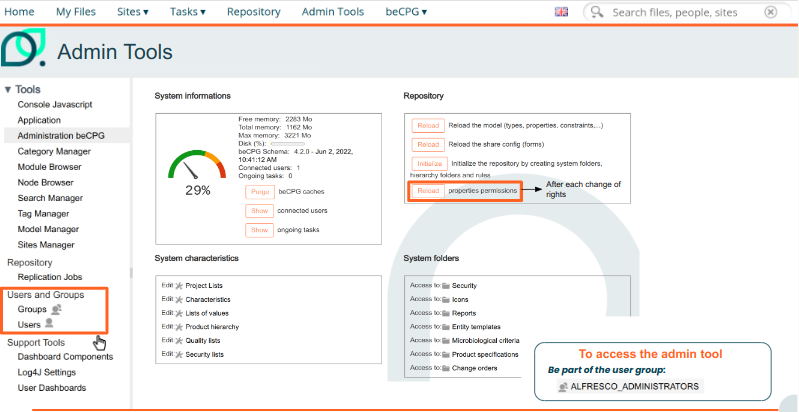
Users management
User management is essential to ensure adequate control of access to data and software functionalities, while guaranteeing security, confidentiality and compliance with internal or regulatory policies.
In beCPG
In the admin tool, via the "New user" button:
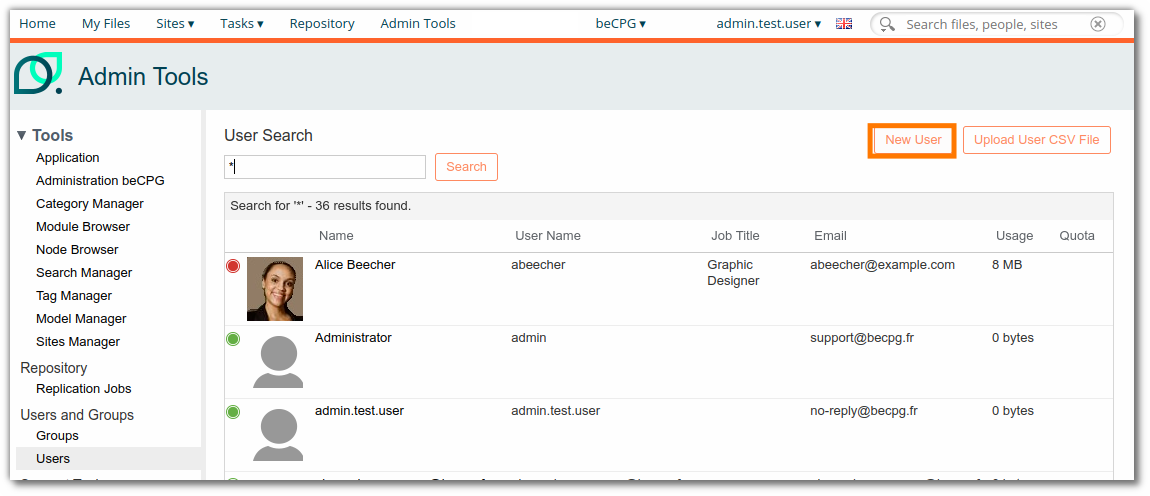
The interface allows you to enter user information (surname, first name, username, email address, etc.) and the groups allowing access to the application.
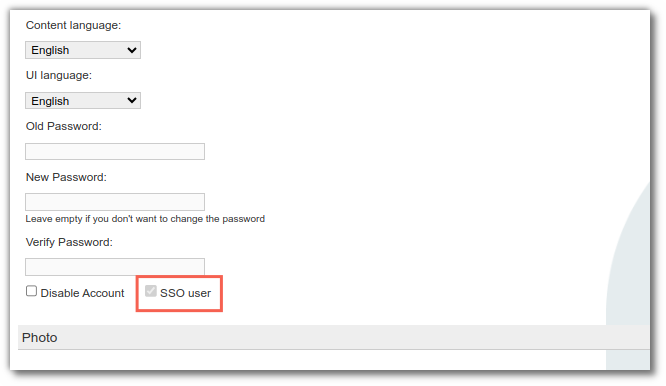
Note: if SSO is enabled on the system, users created in the admin tool will not be able to log in.
Via SSO
SSO (Single Sign-On) is a single authentication mechanism that enables a user to log on once to a system or platform, and then access multiple applications or services without having to log on again each time. SSO simplifies login and password management by centralizing authentication, while improving user experience and security.
When a user logs in via SSO, an account is automatically created in beCPG. Users authenticated via SSO are then identified in the admin tool.
Via imports
For importing users, please refer to this documentation.
User modification
It is possible to modify user information, for example:
- Change password (if forgotten)
- Disable accounts
- Add to a group
- Select interface languages
| Example: add the user to a group. |
|---|
| 1. Find the user and select them in the list that appears. |
| 2. Click "Edit user". |
| 3. In "About the user", find the group (enter the first letter of the group name; see Administration > Group > Browse for the names of the existing groups). |
| 4. Select the desired group by clicking "Add". |
| 5. Save the changes. |
| For systems prior to version 4.2.3: go back to beCPG > Administration and click "Reload permissions". |
| Example: change content and instance languages. |
|---|
| 1. Modify a user. |
| 2. At the bottom of the window, select the content language (multilingual fields) and the instance language (beCPG). |
| 3. Save. |
Group administration
A user group in software refers to a set of users grouped together according to common criteria, such as their roles, responsibilities or needs for access to system functionalities. User group management enables rules and permissions to be applied collectively rather than individually, simplifying administration and access control. The aim is to simplify access management, improve administrator efficiency and ensure that users only have access to the information and functions they need.
In beCPG, groups are administered using the admin tool available in the beCPG administration.
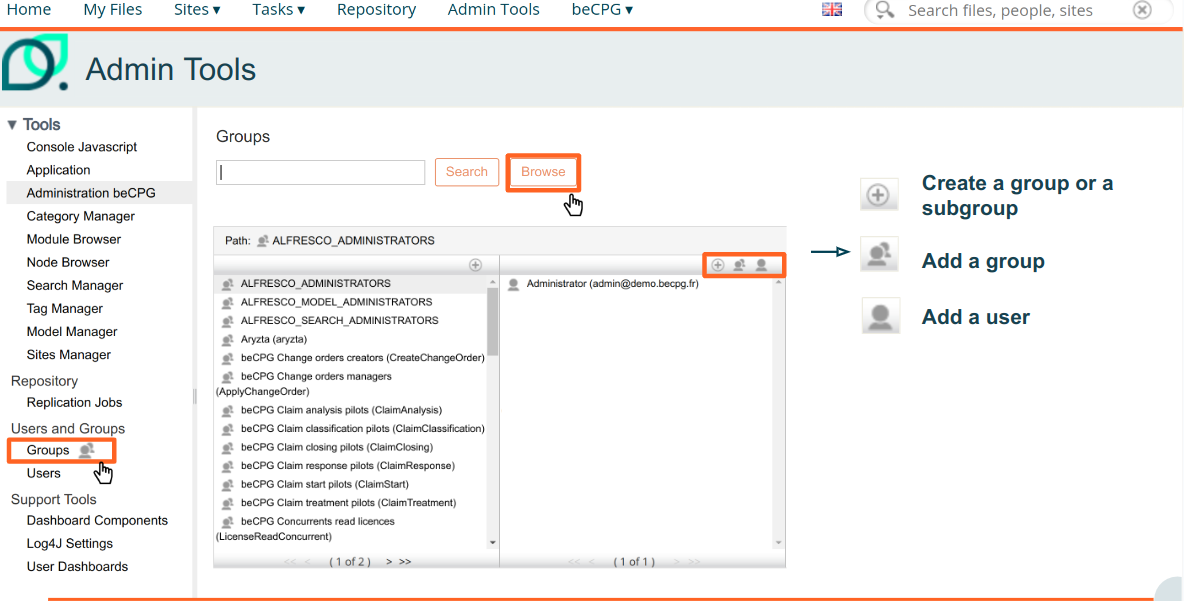
beCPG Standard Groups
beCPG's standard default groups are pre-configured sets of users that are automatically created during system installation. These groups are defined according to standard functions, and are used to manage user access and permissions in a centralized and simplified way.
beCPG groups are:
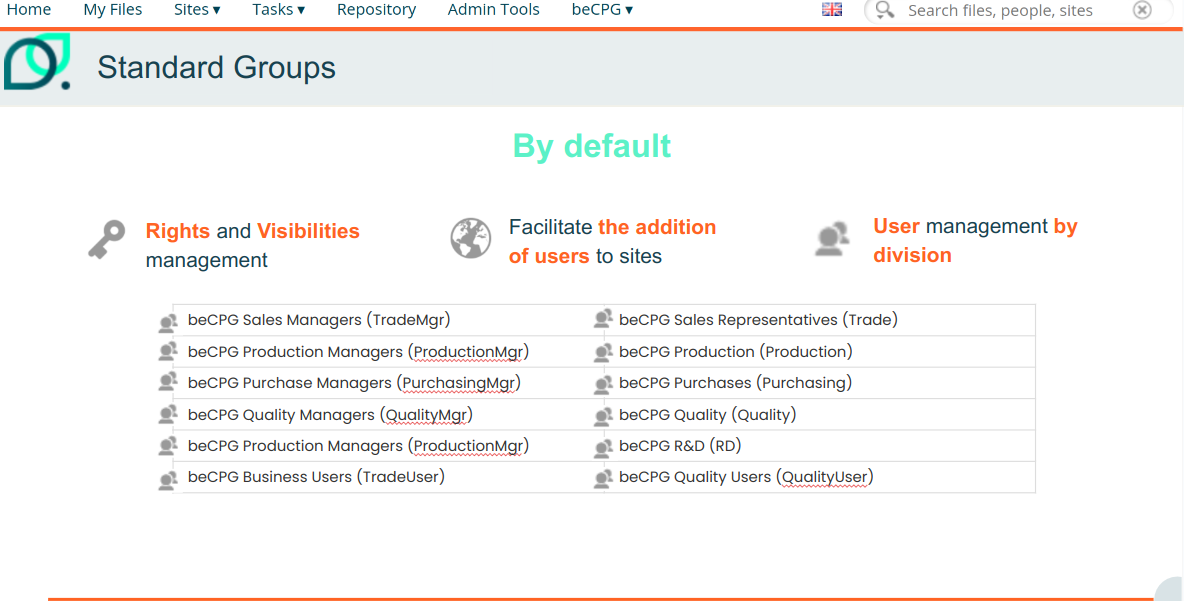
Groups linked to certain modules
Workflow module
| Workflow module |
|---|
| beCPG Start a product validation workflow (ProductValidationStart) |
Supplier Portal module
| Supplier Portal module | |
|---|---|
| beCPG Referencing Managers (ReferencingMgr) | Access an entity that is being referenced |
| beCPG External users (ExternalUser) | Group assigned to a supplier to restrict their access |
| beCPG External users managers (ExternalUserMgr) | Create supplier accounts |
Admin module
| Administration Module | |
|---|---|
| beCPG System Managers (SystemMgr) | Access the beCPG administration |
| Administrator (ALFRESCO_ADMINISTRATOR) | Gives access to beCPG administration + System and user administration |
OLAP module
| OLAP module | |
|---|---|
| beCPG Olap Users (OlapUser) | Accesses OLAP module |
Product Repository Module
| Product Repository Module | |
|---|---|
| Saved Search Manager (SavedSearchMgr) | Allows you to save a search that will be available to all users. |
Change order module
| Change Orders Module | |
|---|---|
| beCPG Change Order Creator (CreateChangeOrder) | Create change orders |
| beCPG Change Order Manager (ApplyChangeOrder) | Apply any change order |
Language module
| Language module | Gives rights to change the language of the content |
|---|---|
| beCPG Language managers (LanguageMgr) | if the group is empty, anyone can change the language for their account, otherwise only people belonging to the group can change their languages |
Customer claim module
| Customer claim module |
|---|
| beCPG Customer Claim Analysis Pilots (ClaimAnalysis) |
| beCPG Customer Claim Classification Pilots (ClaimClassification) |
| beCPG Customer Claim Closing Pilots (ClaimClosing) |
| beCPG Customer Claim Input Pilots (ClaimStart) |
| beCPG Customer Claim Answer Pilots (ClaimResponse) |
| beCPG Pilot (ClaimTreatment) |
License management
WARNING: each beCPG user must belong to one of the license groups.
Licenses in beCPG are managed by groups:
- Named license: license assigned to one user.
- Concurrent license: license shared between multiple users but used by only one user at a time: a user can use the software once another user has stopped using it (voluntary logout or end of session).
- Write license: create and modify products, formulation, generate reports, product approval, use of workflows to manage products, project management.
- Read license: read products, documents and projects, collaboration (blog, wiki pages, forums, data lists), document management.
- Supplier license: allows suppliers to fill in data.
To assign a license to a user, add the user to one of the following groups:
| Licenses |
|---|
| beCPG Concurrents read licences (LicenseReadConcurrent) |
| beCPG Named read licence (LicenseReadNamed) |
| beCPG Concurrents Write licences (LicenseWriteConcurrent) |
| beCPG Named write licences (LicenseWriteNamed) |
| beCPG Supplier concurrents licences (LicenseSupplierConcurrent) |
NB: To find out the number and type of licenses purchased, please refer to your license agreement.