Configuring controls
Multilingual control configuration
To override the list of languages, edit the share-config-custom.xml file:
<config evaluator="string-compare" condition="Languages" replace="true">
      <!-- the list of available language files -->
      <languages>
         <language locale="en_US">English</language>
         <language locale="de_DE">German</language>
         <language locale="es_ES">Spanish</language>
         <language locale="fr_FR">French</language>
         <language locale="it_IT">Italian</language>
         <language locale="ja_JP">Japanese</language>
         <language locale="nl_NL">Dutch</language>
         <language locale="ru_RU">Russian</language>
         <language locale="zh_CN">Chinese (Simplified)</language>
         <language locale="pt_PT">Protuguese</language>
         <language locale="no_NO">Norwegian</language>
         <language locale="sv_SE">Swedish</language>
         <language locale="el_GR">Greek</language>
      </languages>
   </config>
Autocomplete control configuration
Configuring "autocomplete.ftl"
Control paths:
- /fr/becpg/components/form/controls/autocomplete.ftl (for d:text or d:nodeRef fields)
- /fr/becpg/components/form/controls/autocomplete-association.ftl (for associations)
Settings:
- ds (string): datasource used by the control
- parent/parentAssoc (optional, string): parent field (property or association)
- local (optional, boolean, false): indicates whether the datasource is local (Share/Alfresco webscript)
- style (optional, string): style applied to the control
- maxLength (optional, int): max length of the text field
- size (optional, int): text field size
- forceEditable (optional, boolean, false): forces the control to be editable
- showTooltip (optional, boolean, false): indicates whether to show tooltips
- showPage (optional, boolean, true): indicates whether to show the pagination
- showColor (optional, boolean, false): checks the color aspect and displays the color associated with the item
- urlParamsToPass (optional, string): specifies the page URL parameters to send to the plugin as extra values
Parameters specific to autocomplete.ftl:
- parentMode (optional, boolean, false): displays the full path for lists with a parent (e.g. families, tasks)
- saveTitle (optional, boolean, true): indicates whether to save the label or the value
- activateLinks (optional, boolean, false): in read mode, displays the field as an HTML link
- multiple (optional, boolean, false): forces a multiple selection on the control
Parameters specific to autocomplete-association.ftl:
- showLink (optional, boolean, false): in read mode, displays the link to the association
- pageLinkTemplate (optional, string, entity-data-lists?list=View-properties&nodeRef={nodeRef}): overrides the link
- multipleSelectMode (optional, boolean, false): forces a multiple selection on a simple association
The ds parameter specifies the data source, where sourcetype is the plugin to use:
<url>/becpg/autocomplete/{sourcetype}/values/{path}</url>
<url>/becpg/autocomplete/{sourcetype}/associations/{className}</url>
<url>/becpg/autocomplete/{sourcetype}</url>
Example:
<field id="bcpg:entityTplRef" >
<control template="/org/alfresco/components/form/controls/autocomplete-association.ftl">
<control-param name="ds">
becpg/autocomplete/targetassoc/associations/bcpg:packagingKit?classNames=bcpg:entityTplAspect&excludeProps=bcpg:entityTplEnabled%7Cfalse
</control-param>
<control-param name="pageLinkTemplate">entity-data-lists?list=View-properties&nodeRef={nodeRef}</control-param>
</control>
</field>
Public data sources
The following plugins are part of the public API and can be used for specific settings:
TargetAssocAutoCompletePlugin
This is the default plugin. It searches associations by type. It manages several levels of filters (by aspects, by properties and by associations).
Source code with the Javadoc and all configuration arguments:
DataListItemAutoCompletePlugin
Autocomplete plugin suggesting dataListItems from specific sources.
Source code with the Javadoc and all configuration arguments:
ProductAutoCompletePlugin
Autocomplete plugin that helps find a product. Products are automatically boosted by product status and query; archived products are excluded: query^10 AND (Valid^4 OR ToValidate^2 OR Simulation)
Source code with the Javadoc and all configuration arguments:
ListValueAutoCompletePlugin
Autocomplete plugin to retrieve lists of values.
Source code with the Javadoc and all configuration arguments:
LinkedValueAutoCompletePlugin
Autocomplete plugin to retrieve related values (hierarchy).
Source code with the Javadoc and all configuration arguments:
CertificationAutoCompletePlugin
Autocomplete plugin to retrieve the list of certifications from all suppliers associated with the product or, if the entity is not a product, all certifications from the certification list.
Source code with the Javadoc and all configuration arguments:
SupplierPlantAutoCompletePlugin
Autocomplete plugin that retrieves the plants of the supplier. If the logged-in user is associated with the supplier, the plugin returns all plants in the plant list of this supplier; otherwise, it returns all plants in the system.
Source code with the Javadoc and all configuration arguments:
Custom data sources
To provide a datasource to the control, implement a Java plugin.
An example is provided in the designer module.
Java class:
@Service
public class ExempleAutocompletePlugin extends AbstractBaseListValuePlugin {
    @Override
    public String[] getHandleSourceTypes() {
        return new String[] {"exempleSourceType" };
    }
    @Override
    public ListValuePage suggest(String sourceType, String query, Integer pageNum, Map<String, Serializable> props) {
           ...
        }
}
Datasource URL:
    <control template="/fr/becpg/components/form/controls/autocomplete.ftl">
       <control-param name="ds">becpg/autocomplete/exempleSourceType</control-param>
    </control>
Decision tree control configuration
To configure a decision tree on a text field, add a control-param in the appearance section:
    <control template="/org/alfresco/components/form/controls/decision-tree.ftl">
        <control-param name="prefix"></control-param>
        <control-param name="data">
      </control-param>
   </control>
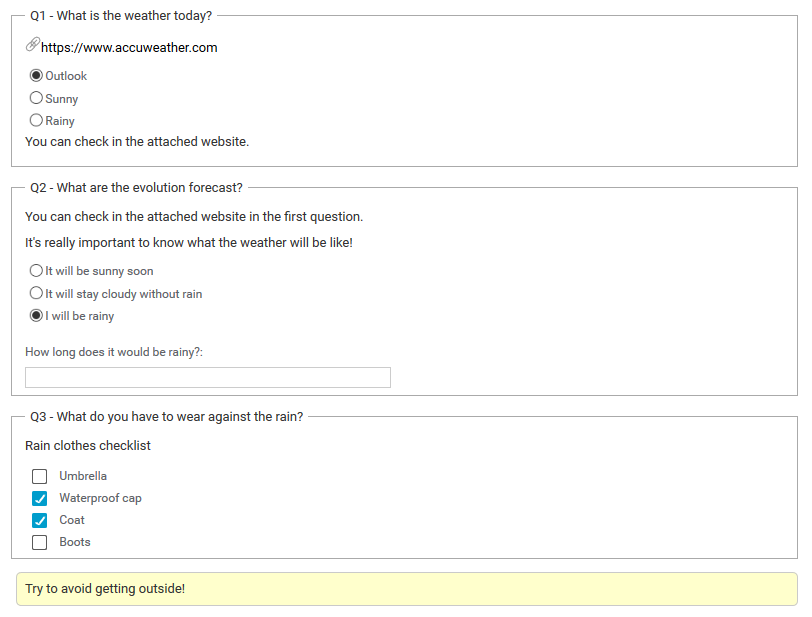
Add the decision tree, in JSON format, in the control-param name="data". Here is a simple example of a decision tree:
                [
                    {
                    id : "q1",
                    start : true,
                    label : "What is the weather today?",
                    url : "https://www.accuweather.com",
                    lowerNote : "You can check in the attached website.",
                    mandatory : true,
                    choices : [
                        {
                           id : "q1r1",
                           label : "Outlook",
                           cid :  "q2"
                        },
                        {
                            id : "q1r2",
                            label : "Sunny",
                            cid :  "r1"
                        },
                        {
                            id : "q1r3",
                            label : "Rainy",
                            cid :  "q3"
                        }
                        ]
                    },
                    {
                    id : "q2",
                    label : "What are the evolution forecast?",
                    upperNote: "It's really important to know what the weather will be like!",
                    note : "You can check in the attached website in the first question.",
                    mandatory : true,
                    choices : [
                        {
                          id : "q2r1",
                           label : "It will be sunny soon",
                            cid :  "r1"
                        },
                        {
                            id : "q2r2",
                            label : "It will stay cloudy without rain",
                            cid :  "r2"
                        },
                        {
                            id : "q2r3",
                            label : "I will be rainy",
                            comment : true,
                            commentLabel: "How long does it would be rainy?",
                            textarea : true,
                            cid :  "q3"
                        }
                        ]
                    },
                    {
                    id : "q3",
                    label : "What do you have to wear against the rain?",
                    note : "Rain clothes checklist",
                    mandatory : false,
                    choices : [
                        {
                            id : "q3r1",
                            label : "Rain clothes checklist",
                            list: ["Umbrella","Waterproof cap","Coat","Boots"],
                            multiple : true,
                            checkboxes : true,
                            cid :  "r3"
                        }
                        ]
                    },
                    {
                    id : "q4",
                    label : "Have you got any remarks?",
                    mandatory : false,
                    choices : [
                        {
                          id : "q4r1",
                          label : "hidden",
                          comment : true,
                          textarea: true
                        }
                        ]
                    },
                    {
                            id : "r1",
                            label : "Enjoy your bright day!"
                    },
                    {
                            id : "r2",
                            label : "Beware to not take cold!"
                    },
                    {
                            id : "r3",
                            label : "Try to avoid getting outside!"
                    }
                ]
Here are the main properties of a decision tree:
- id: the ID of the question or answer. For clarity, we advise using "q" for questions and "r" for responses, for instance.
- start: lets you choose which question(s) to display at the start of the decision tree.
- label: text of a question/answer/response displayed in beCPG. For a free text question without any choice, use label : "hidden" and comment : "true".
- note: additional text above the answers. Useful to split a long question or add information.
- upperNote: additional note above the answers, at the same position as note. Useful to add a new line of text above the answers.
- lowerNote: additional text below the answers.
- url: adds a URL link. You can add more than one using an array, like ["link1","link2"].
- mandatory: defines whether answering the question is mandatory.
- cid: defines the next step by calling the next question/answer ID. You can call several questions/answers using an array, for example ["question1","question2"] or ["question1","response1"].
- multiple: lets the user choose several answers from the list array.
- checkboxes: displays the possible answers as checkboxes. Works only with multiple : true.
- comment: lets the user fill in a free text box if the linked answer is selected.
- commentLabel: text displayed for the comment section.
- textarea: displays the comment section as a text area if true.
Note: users can also deselect a single-choice answer by double-clicking it.