Label Claims
Claims are used to record or calculate claimable information.
There are three types of claims in beCPG:
- Certification type claims
- Nutritional claims
- Manual claims
Certification type claims (e.g. halal, organic, palm oil free, RSPO, etc.)
These claims are managed at raw material level, as for allergens.
The following statuses are available on the raw material:
- Not applicable: The claim is not applicable to the raw material.
- Suitable: The raw material complies with the claim, but is not certified.
- Yes: The raw material complies with the claim, and there is no need for a certificate.
- Certified: The raw material complies with the claim, and is certified.
- No: The raw material does not meet the claim.
Once these statuses are filled in, the status of the claims is calculated on the finished product according to the following conditions:
- Suitable: If all raw materials are Not Applicable, Suitable, Certified or Yes
- Yes: If all raw materials are Yes, Certified or Not Applicable
- No: If any of the raw materials in the product is No. The raw material is then indicated in the "Not claimed by" column.
There are two options for linking a certification to a claim:
- Link a certification to its plant: Create the certification in the "Certification" characteristic of the administration, then link it to the plant via the "Plants" characteristic. Ensure that the plant is attached to the entity to make it available in the certification field.
- Link a certification to its supplier plant: Create the certification in the "Certification" list of the supplier entity, then link it to the plant via the "Plants" list. Ensure that the supplier and the supplier plant are attached to the entity to make it available in the certification field.
Nutritional claims
Included in beCPG, they are automatically calculated on the finished product in relation to its nutritional values. They are defined by country or by region (European Union, USA, China). e.g.: EU Low energy value if the energy value of the finished product is less than 40 kcal for solids and 20 kcal for liquids.
Manual claims
Entered on the finished product, they let you record a claim or certification for the finished product. e.g.: Finished product certified fair trade, etc.
Columns
The claim tab in beCPG contains the following columns:
- Type: Used to categorize claims (e.g. certification, nutrition, health). The type is assigned to the claim from the administration.
- Is claimed: Not applicable, Suitable, Yes, Certified or No.
- % Claim: Indicates the proportion of raw materials that meet the claim (e.g. 97% organic).
- % Applicable: Specifies the proportion of raw materials that may be designated by the claim (for example, some raw materials may not be considered organic).
- Certification: Allows you to link a claim to its certification. To add certifications to the drop-down list, click here.
- Not claimed by: Identifies raw materials that do not meet the claim.
- Additional information: Allows you to enter a comment on the claim.
- Manual: Enables manual entry, without formulation from entities added in the composition.
- Reports: Lists the report(s) where the claim will be displayed (e.g. Customer Record, Production or None - not displayed).

Modify or create a claim
Claims can be added or modified in the administration area. Click here for more information.
See details of the percentages claimed and applicable
To view the details of the claimed % and applicable %:
- Click the "..." button to the right of the relevant line.
- Select the "Detail" option from the drop-down menu.
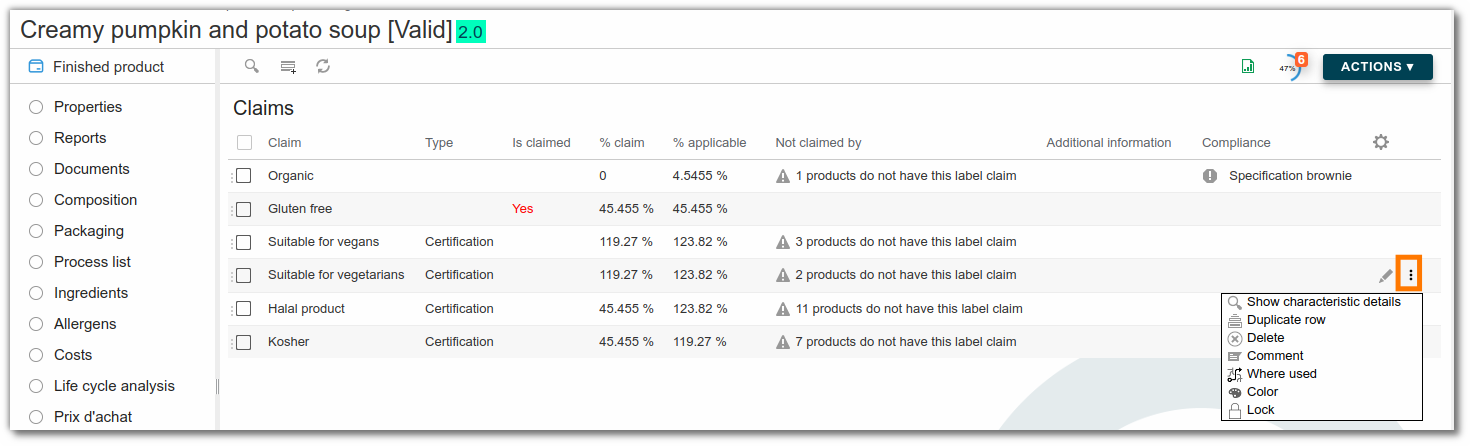
- A window opens with detailed information about the applicable and claimed percentages.
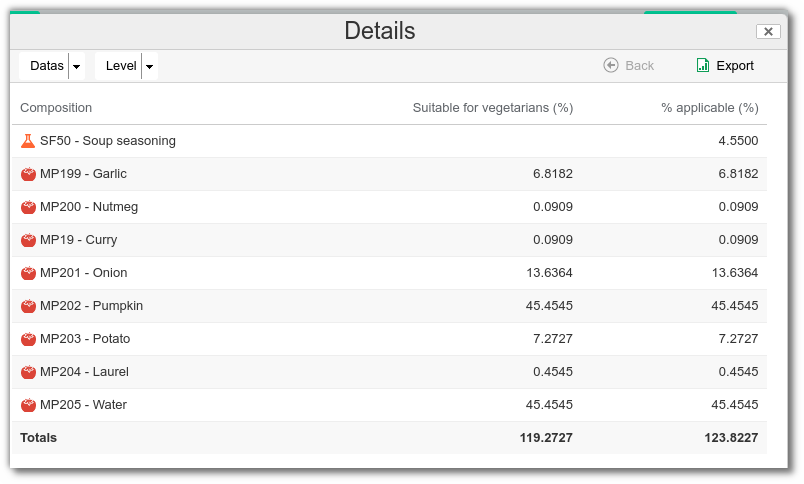
This feature allows you to view the exact rates used in the calculation, so you can better understand any discrepancies or adjustments made.
Use a claim with a reference entity
Some claims, such as "(nutrient)-reduced -30%", are calculated against a reference product.
When you associate these claims with your entity, you must associate the reference product or entity. It can be a finished product or a semi-finished product.
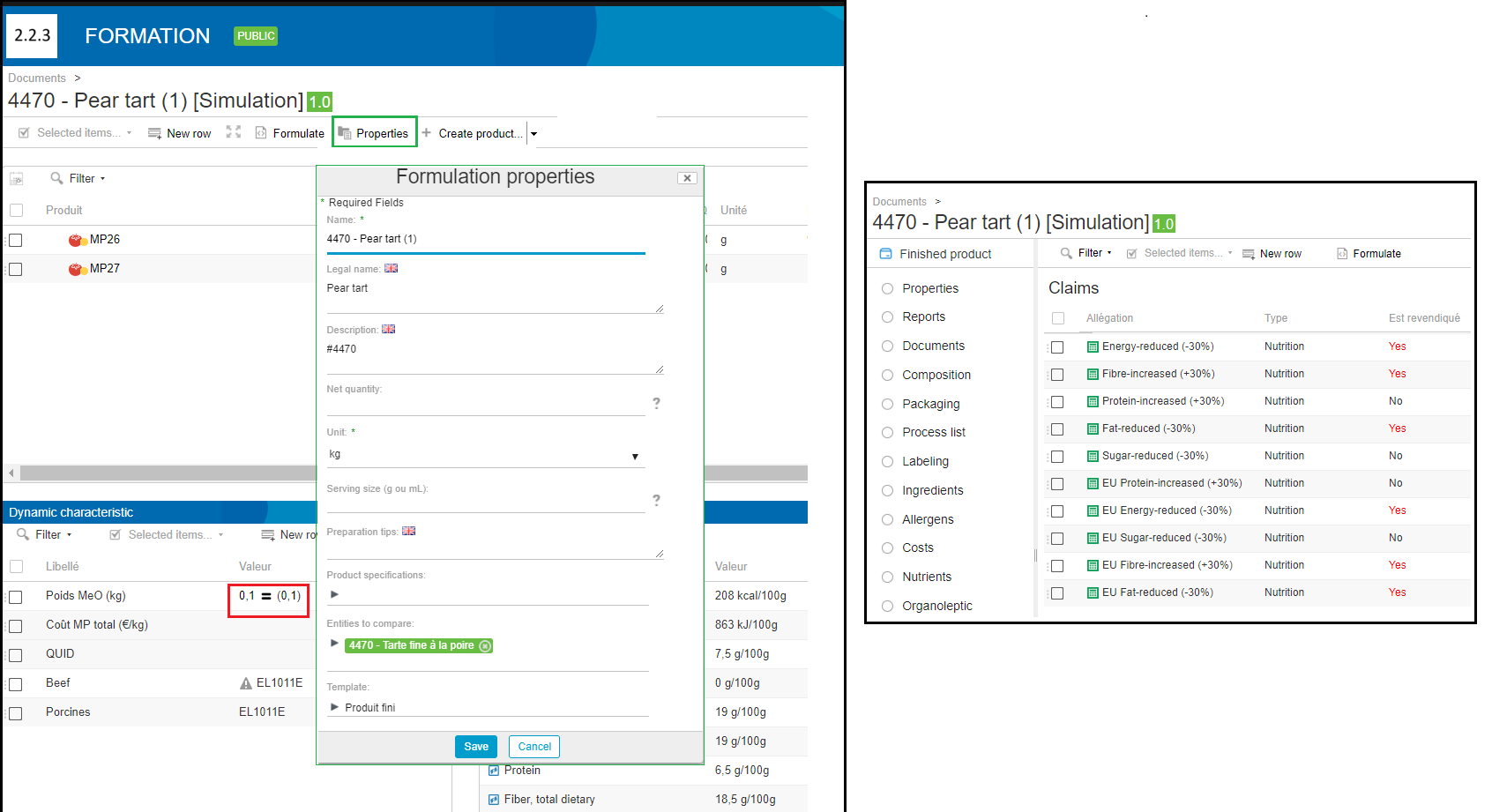
To compare your product with another entity and automatically calculate these claims, in the composition list:
- Click "Properties".
- In the "Entity to compare" field, select the finished or semi-finished product of your choice.
- Save.
- Formulate.
Use of organic claims (before version 4.2)
For the automatic calculation of the EU organic claim, fill in the following two physico-chemical characteristics of your raw materials:
- Agricultural origin
- Certified organic raw material content
Example:
- wild salmon: Agricultural origin = 0% / Certified organic raw material content = 0%.
- farmed salmon: Agricultural origin = 100% / Certified organic raw material content = 100% or 0% depending on the type of farm.
- water: Agricultural origin = 0% / Certified organic raw material content = 0%.
- salt: Agricultural origin = 0% / Certified organic raw material content = 0%.
The calculation for the finished product is: (Certified organic raw material content / Agricultural origin) x 100. If the result is greater than 95%, the product is eligible for organic certification.